
ePSXe for Android
epsxe software s.l.Arcade
4.55.54K Reviews
- Version
- 2.0.19
- Installs
- 1.00M
- Age Rating
- Everyone
Screenshots
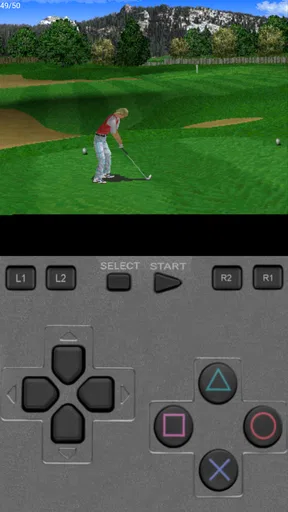
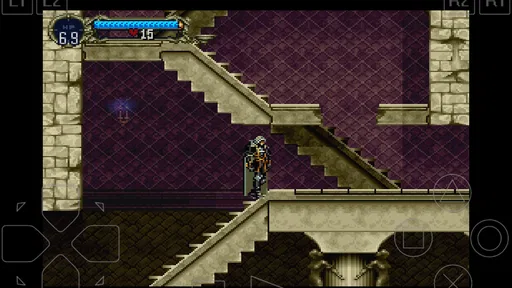
Our Review of ePSXe for Android
 Analysis by Appyee
Sharing a phone or tablet can make a retro game session feel like a small household event: one person takes a turn, another watches, and someone else asks to try the next level. That casual setup is where ePSXe for Android makes the most sense to me. It brings classic PlayStation gaming to a device that is already close at hand, but it works best when the person setting it up takes a little care with files, controls, and expectations.
A shared screen, with one person handling the setup
On a shared Android device, I would treat the emulator as a game space that needs a clear organizer rather than something every user configures independently. One person can prepare the files and choose a game, then pass the device around for short turns. That avoids the familiar household tangle of several people moving files, changing settings, or wondering why a game no longer appears where they expect it.
A practical example is a quiet evening when a child wants to see a game an adult remembers, or when friends are waiting together and take turns trying a familiar level. The appeal is not only playing on the go; it is also having an easy conversation starter on the same screen. For longer sessions, a separate controller can make passing turns more comfortable than relying on touch controls, while the phone or tablet stays in one place.
Decide who manages files and settings
The main setup boundary is the game library itself. Before handing the device to someone else, I would organize the BIOS file and game files into clearly named folders and check that the intended titles load. That simple bit of housekeeping is more useful than repeatedly searching through a crowded storage area. It also makes it easier for another person to find the right game without changing the underlying setup.
There is a real distinction between installing the emulator and preparing it to play. The app does not remove the need to arrange the required BIOS and game files, so someone unfamiliar with emulation may need to work through that part before a shared session begins. I would not plan an impromptu game night around a device that has never been configured; test the intended title first, then leave the device ready for everyone else.
That file-based workflow also affects who should manage the device. If several people use it, agree that one person handles folder changes and settings. This is not a special family-control feature; it is simply a sensible way to avoid accidental confusion. When a game disappears from the list, checking the folders and file locations is a better first step than reinstalling the emulator.
Coordinate turns and choose controls for the room
Touchscreen play is convenient when I am alone or carrying only a phone, but it can be less comfortable when several people are taking turns. A Bluetooth controller is a useful alternative if one is already available, especially for games that rely on quick, precise input. Before a group starts, I would connect and test the controller, then make sure everyone knows how the controls are laid out. That small check can prevent the first part of a session from becoming a troubleshooting break.
The split-screen option can suit local multiplayer, but it is not automatically the best choice for every shared situation. A compact phone screen may feel cramped when two people need to see the action, so a larger Android display is a more comfortable place to try it. For a single-player game, taking turns can be more enjoyable than crowding around a small display. The right arrangement depends on the game, the screen, and whether the people playing prefer cooperation, competition, or simply watching.
I would also keep sessions flexible. A classic game can be easy to pick up for a short break, but some titles ask for attention and longer stretches of play. If several people are sharing one device, agree on a natural stopping point before a long section begins. That is especially helpful when someone else needs the phone for ordinary daily use.
Age, trust, and what the rating means at home
The game is rated Everyone, which makes its age classification broadly approachable, but I would still choose titles with the actual player in mind. The emulator is a way to run PlayStation games; the experience depends on which game the household selects. An adult should review a title before handing over the device if they are unsure whether its themes suit a younger player. The rating attached to the emulator should not be mistaken for a guarantee that every game loaded into it has the same tone.
There is also a trust issue around files. I would use game files that I am entitled to use and keep the source and organization clear, rather than treating the emulator as a place where every downloaded file is automatically appropriate or safe. For a child using a shared device, an adult can prepare the library and limit the session to the games they have chosen. That is a household decision, not a control built into the emulator.
Account boundaries matter too. If the device belongs to one person but is regularly borrowed, keep the emulator’s files and settings under the owner’s oversight. A guest can enjoy a game without needing to manage the library. This arrangement is less confusing than expecting every player to understand how the emulator’s supporting files are arranged.
Getting Started with ePSXe
First things first, let’s talk setup. Downloading and installing ePSXe for Android is a breeze. You can find it on the Google Play Store, and it’s just a few taps away from being your new favorite app. Once installed, you’ll need to get a BIOS file and your game ROMs ready. It’s a bit of a hunt, but the payoff is worth it. Plus, there are plenty of guides online to help you through the process.
Features That Stand Out
One of the coolest things about ePSXe is its wide range of features. It supports high compatibility with most PlayStation games, so you can dive into classics like "Final Fantasy VII" or "Crash Bandicoot" without a hitch. The app also offers a split-screen mode for multiplayer action, which is perfect for when you want to challenge your friends.
There’s also support for external controllers, making the gaming experience even more authentic. If you’ve got a Bluetooth controller lying around, it’s time to dust it off. You can even tweak the graphical settings to enhance the visuals, bringing a fresh look to your favorite old-school games.
Performance and User Experience
Now, let’s talk performance. I’ve tried running several games on different devices, and the app handles them like a champ. On most modern Android phones, you can expect smooth gameplay with minimal lag. It’s kind of magical how these classics run so well on a device that fits in your pocket.
The user interface is straightforward. Even if you’re not the most tech-savvy person, you’ll find navigating through the app pretty simple. Loading games, saving your progress, and adjusting settings can all be done with just a few taps. It’s intuitive and just works, which is what you want when you’re eager to jump back into "Metal Gear Solid."
A Few Tips for the Best Experience
To make the most out of ePSXe, consider these tips. Firstly, keep your BIOS file and game ROMs organized in folders; it makes finding and loading games quicker. Secondly, if you’re planning a gaming marathon, make sure your device is well-charged or plugged in, as gaming can be a bit of a battery drainer.
Additionally, tweaking the settings can help if you encounter any performance hiccups. Adjusting the frame skip or graphical settings can make a difference if a particular game is running a bit slow. It’s all about finding that sweet spot for your device.
What to expect from a paid emulator
This is a paid arcade game from epsxe software s.l., priced at $3.75, and it has an average rating of 4.5 from 57K ratings, with 5.5K written reviews and over 1 million installs. It first appeared on August 29, 2012; version 2.0.18 supports Android 2.3 and later. Those details make it a long-running option, but the practical question is whether you want a dedicated emulator and are comfortable preparing its supporting files.
Compared with ordinary arcade games that open straight into their own content, ePSXe asks more of the player before the first round: you need to set up the BIOS and game files, and the experience varies with the title and device. In return, it is aimed at people who want to revisit a library of PlayStation games rather than play one self-contained mobile game. If you want something that works immediately without file preparation, a conventional Android game is the simpler choice. If your priority is carrying familiar console games around and you are willing to organize them, this emulator has a more specific appeal.
I would not recommend it as the easiest pick for someone who has never handled emulator files and wants a zero-setup experience. Nor would I choose it when the only goal is quick, casual play and a touchscreen game would do. Its strengths matter most to someone with a particular PlayStation game in mind, a compatible Android device, and patience for initial configuration.
Small adjustments that make sessions smoother
One useful habit is to test a game in the same way you plan to play it. If you expect to use a Bluetooth controller, check the game with that controller before a long session rather than assuming touch and physical controls will feel identical. If you intend to share a phone, try the screen position and button layout while holding it as the players will. This reveals awkward controls early, when changing the setup is easy.
Keep changes focused when troubleshooting. If a title runs poorly, adjust one graphics or performance setting at a time and try the same section again. Changing several options together makes it harder to tell which adjustment helped, and may leave you with a setup that feels worse. If performance is already smooth, there is little reason to tune settings just because the option exists.
For travel or a short break, a phone makes the emulator convenient, but battery use is worth planning around. I would begin with a charged device and avoid assuming that a long session will be as light on battery as ordinary browsing. At home, playing while plugged in or using a tablet on a stable surface can be more comfortable; away from home, shorter sessions are the safer expectation.
Who will enjoy it, and who may prefer something else
The best fit is a retro player who already knows which PlayStation games they want to revisit, enjoys adjusting an emulator when needed, and likes having a portable option. It can also work well for a household where one person takes responsibility for setup and others join in to watch, take turns, or use a controller. The emulator’s split-screen mode gives local play another possibility, though the display size and the game itself still shape how enjoyable that is.
Someone looking for a polished, ready-made mobile game may be happier with a standard arcade title. A person who dislikes managing files may also find the initial preparation more annoying than the nostalgia is worth. And if a game’s controls feel awkward on a touchscreen, a physical controller can help, but buying or finding one is an additional consideration rather than a requirement I would assume everyone has covered.
When a game does not show up, I would first check that its file is in the folder being used and that the supporting BIOS file is in place. If it loads but feels slow, test a modest settings adjustment instead of immediately blaming the device. If the goal is shared play, check controls and screen comfort before inviting everyone to join. These are small, practical checks, but they address the most likely points where an otherwise enjoyable session can stall.
Wrapping It Up
In conclusion, ePSXe for Android is a must-have for any retro gaming enthusiast. It’s like carrying a piece of gaming history in your pocket, ready to be relived whenever nostalgia strikes. With its robust feature set, excellent performance, and user-friendly interface, it’s hard to find any reason not to give it a try. So, dust off those old ROMs, grab a controller, and get ready for some serious throwback fun!
My household verdict is a little more measured: I would recommend it to someone who wants specific PlayStation classics on Android and is prepared to set up the files carefully. For a shared device, assign one person to manage that setup, choose games with the players’ ages in mind, and test the controls before a group session. With those expectations in place, it can turn spare moments into a welcome trip back to console gaming; without them, a simpler game may be the better fit.
Verdict
Strengths of ePSXe for Android
- Smooth performance on most devices.
- Wide compatibility with PS1 games.
- Customizable controls for comfort.
- Supports save states for progress.
- High-quality emulation experience.
Limitations of ePSXe for Android
- Limited free version features.
- Occasional graphical glitches.
- Complex setup for beginners.
- No built-in game library.
- Requires BIOS file setup.
Similar Picks in This Category
View All
Subway Surfers
SYBO Games4.6

Stickman Party 234 MiniGames
PlayMax Game Studio4.6

Subway Princess Runner
Ivy4.4

Temple Run
Imangi Studios4.2

Zombie Tsunami
Mobigame SAS4.6

Stack Ball - Crash Platforms
CASUAL AZUR GAMES4.5
Frequently Asked Questions
What is ePSXe for Android?
ePSXe for Android is a highly popular PlayStation emulator that allows users to play their favorite PS1 games on their mobile devices. It provides excellent compatibility, speed, and accuracy, making it a preferred choice for retro gaming enthusiasts. It offers features like customizable controls, virtual touchscreen pad, hardware buttons mapping, and more.
Is ePSXe for Android easy to set up?
Yes, setting up ePSXe for Android is relatively straightforward. After downloading the app, you'll need to obtain a BIOS file and ROMs of the games you wish to play. The app guides you through the setup process, and there are plenty of online resources available to help with any difficulties.
What are the key features of ePSXe for Android?
ePSXe for Android boasts several notable features, including high compatibility with most PlayStation games, customizable controls, and support for external gamepads. It also offers split-screen mode for multiplayer gaming, OpenGL enhanced graphics, and save state functionality, making it a comprehensive emulator for PS1 games.
Are there any compatibility issues with ePSXe for Android?
While ePSXe for Android is known for its high compatibility, some games may still experience minor glitches or performance issues. These are typically related to the specific ROM or BIOS file used. Most popular games run smoothly, and regular updates aim to resolve any existing issues.
Is ePSXe for Android free to use?
ePSXe for Android is a paid application on the Google Play Store. The cost provides users with access to all features without ads, ensuring an uninterrupted gaming experience. While there are free alternatives, ePSXe's performance and reliability make it a worthwhile investment for serious retro gamers.
Play our best games!


